VoiceCulture Dashboard
The VoiceCulture Dashboard is a custom tool designed to help manage, visualize, and maintain large sets of localized voice-over assets across multiple cultures and actors.
It is split into two tabs:
- Overview – Displays active profile and culture coverage
- Voice Actors – Organizes assets per actor and enables batch operations
Open the dashboard

Overview Tab
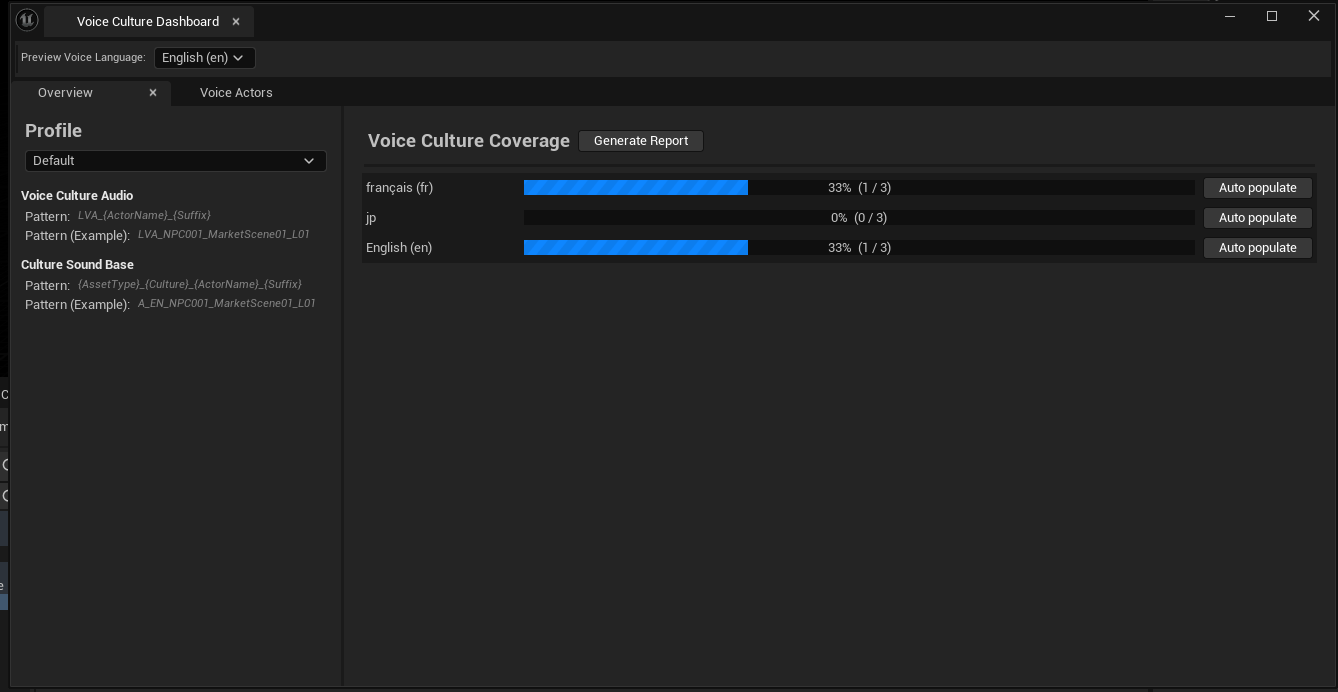
This tab lets you select the current strategy profile and run a coverage analysis on the entire project.
Profile Section
- Allows selecting one of the defined
StrategyProfiles - Shows pattern examples based on the currently active profile
- Profiles define how to extract information from asset names (e.g., actor codes)
Culture Coverage
- The
Generate Reportbutton scans allUSSVoiceCultureSoundassets in the project - For each culture, it calculates how many voice assets are present
- Coverage is shown as a progress bar, per culture
- The
Auto Populatebutton next to each culture attempts to fill missing culture entries using naming strategies
Voice Actors Tab
This section helps manage Voice Actors extracted from the naming convention of your assets (based on the current strategy).
Actor Detection
- Assets are scanned and grouped into logical actors (e.g.,
NPC001,Hero01) - Actor names are extracted using prefix strategies (e.g., second token of asset name)
Click Rescan Actors to refresh this list.
Asset List per Actor
When you select a voice actor, the right panel shows all USSVoiceCultureSound assets that belong to them.
Features include:
- Search box to filter actors
- Asset list for the selected actor
- Missing Culture / Complete Culture filters
- Auto Populate Missing Cultures for the selected actor
This helps quickly detect incomplete localization coverage for specific characters.

Strategy-Based Detection
Both tabs use the active profile's naming strategy to match and organize voice assets. A profile might define a pattern like:
LVA_{ActorName}_{Suffix}
or
A_{Culture}_{ActorName}_{Suffix}
These patterns are used for:
- Extracting actor identity
- Detecting missing or present culture entries
- Auto-populating asset references
You can fully customize or add new strategies via StrategyProfiles in the Editor Settings.